Large Files Aren't Sent as One Block
Do you think a large file is transferred from one device to another as a single block? It actually doesn’t work that way. Let me explain it to you in simple terms.
Just imagine you are transferring a 7.5 GB file to your friend. The internet does not directly move your file from one device to another in a single take. Instead, the file is divided into millions and millions of tiny pieces, which we call data packets.
Why not send it all at once? If one person sent a huge 7.5 GB file as a single block, it would create a big traffic jam. This would stop everyone else from using that network path until the transfer finished. By breaking files into packets, millions of users can share the same internet “roads” at the same time.
What Are Data Packets?
But there is a catch here, each data packet has a size limit depending on the protocol and network conditions. It is usually around 1.5 KB. So just imagine how many packets a 7.5 GB file would be split into before transmission.
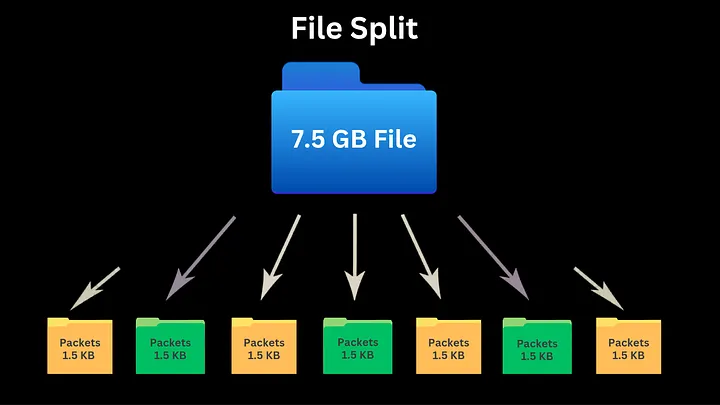
Large files are divided into 1.5 KB packets before traveling across the network.
7.5 GB / 1.5 KB = 5,000,000 data packets
What do these data packets hold? Think of each data packet as a small envelope that you send to your friend.
Every single data packet contains:
- Source IP address ( where it came from )
- Destination IP address ( where it should go )
- The actual data ( 1.5 KB )
- The sequence order
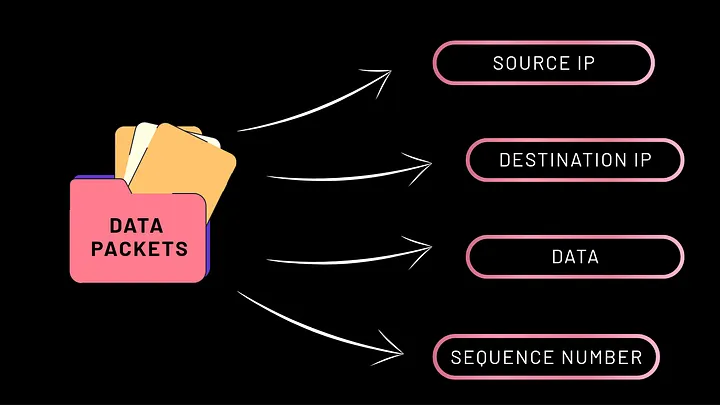
The four essential components found inside every single data packet.
How Packets Travel
Once the data packets are created with all the needed information, they are ready to travel through the internet. Surprisingly, not all packets need to take the same route to travel. Different packets may travel through different network paths before reaching the destination.
When a packet successfully reaches your friend, who is your receiver, the receiver sends back an acknowledgement saying:
“Packet received successfully.”
If a packet is lost midway or corrupted during the transmission process, don’t worry — the internet doesn’t panic like you panic when your Wi‑Fi drops during a World Cup final.
The sender automatically transfers that specific packet again to the receiver. This process continues until all the data packets safely reach the destination without any data missing.
Reassemble at the Destination
This is where the use of sequence order comes in. After all the data packets are received by the receiver, the device uses the sequence number to arrange them in the correct order and rebuild the original file. Without a sequence number, your file would look like your messy room.
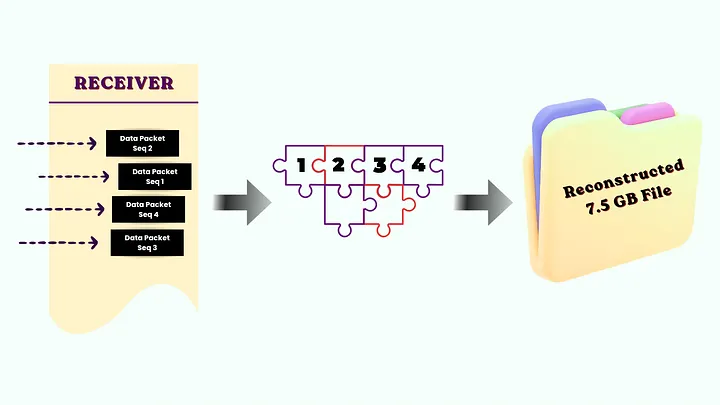
The receiver uses sequence numbers to reorder the packets and rebuild the original file
Behind the Scenes Summary
So even though it feels like you are sending a large file directly, what happens behind the scenes is:
- The large file is split into millions of data packets.
- Each packet travels independently across the Internet.
- Lost or corrupted packets are retransmitted automatically.
- The receiver reorders and reconstructs the original file.
This is why the internet feels fast and dependable; it’s all thanks to packets, which make communication efficient, reliable, and scalable.
So, next time when you send a big file to your friend, it’s not magic - it’s millions of tiny packets running around like Hogwarts owls delivering letters to the right house - but at internet speed.